News

University’s AI Chat Models Updated

The Data Center (ZDV) has activated two new AI models and two image generation models in the university's AI chat. You have until the end of September to explore the new capabilities of these models.

Shortly before the start of the semester, the models will likely be updated again or replaced with more powerful versions. We will inform you in due course about the specific model versions we will be using for the winter semester.

The models: MiniMax M3 and Qwen3.6 35B

MiniMax M3 is flexible and can be used like a traditional AI assistant. It is suitable for complex and agent-based tasks in which the model must independently plan and execute multiple steps. MiniMax M3 is also suitable for coding: It can solve programming tasks in common languages, explain code, find errors, and assist with debugging.

Qwen3.6 35B, a mixture-of-experts model with reasoning mode enabled, is suitable for tasks that require multi-step logical reasoning. Thanks to their multimodal capabilities, both models can process images, diagrams, tables, and screenshots.

Create and edit images

Z-Image-Turbo is a simplified and optimized version of the Z-Image image creation model. With just a few computational steps per image, the model achieves results comparable to or better than those of leading competing models. The reduced number of computational steps lowers computational effort and energy costs without compromising image quality. The Lightning variant of the Qwen-Image-Edit-2511 model allows users to modify existing images.

The new MiniMax M3 and Qwen3.6 35B models automatically access the Z-Image-Turbo and Qwen-Image-Edit-2511 image models as needed.

Strong benchmark results for the models

Established benchmark tests help put the performance of the new models into perspective. MiniMax M3 achieved a score of 59.0 percent on the SWE-Bench Pro benchmark, a test designed to evaluate practical programming skills. This places it ahead of GPT-5.5 and Gemini 3.1 Pro and just slightly behind Opus 4.7. In Terminal-Bench 2.1, another standard test for AI systems, MiniMax M3 achieved 66.0 percent, exactly the same level as Opus 4.7.

The developer of Qwen3.6 35B has also published benchmarks in which agent-based programming emerges as a strength of the model. On SWE-Bench Pro, a test in which the model must independently solve real-world software problems in actual code repositories, Qwen3.6 scored 49.5 points, placing it well ahead of Google’s Gemma 4 31B, which scored 35.7 points in the same test series.

In the MMMU-Pro benchmark, which tests multimodal understanding and reasoning based on technical texts, images, diagrams, and tables from various disciplines, Qwen3.6 scored 75.3 points, placing it just behind Gemma 4 31B (76.9) but well ahead of Claude Sonnet 4.5, which scored 68.4 points in the same evaluation.

Current models will be discontinued at the end of September

The MiniMax M3 and Qwen3.6 35B models are intermediate versions. Shortly before the start of the semester, the models will likely be updated again or replaced with more powerful versions. We will inform you in due course about the specific model versions we will be using for the winter semester.

The models GPT OSS 120B, Qwen3 235B (VL/Thinking) and Qwen3 Coder 30B will be discontinued at the end of September. In the application, these are currently marked as “retires in October”.

Until the end of September, we recommend not starting any new extensive or longer research experiments using the existing models and complete any experiments already started with the respective model.

Model updates every semester

In the future, we plan to update the models once per semester. These updates will take place during the break between semesters and will be announced in advance. The model switch will not result in any fundamental changes for users. The models will become more powerful, more reliable, and of higher quality. In addition, the ZDV will update the AI chat user interface (OpenWebUI) during breaks between semesters and add new features. Predefined prompts that have already been created can normally continue to be used.

For more information about the models and other important notes, please visit our website:
https://www.en-zdv.uni-mainz.de/ai-at-jgu/


More news from the Data Center → may be found here.

Posted on | Posted in News | Tagged

The Moodle database will be updated from September 1 to 3, 2026

Due to a necessary database update, the ZDV will take Moodle offline from September 1 to September 3, 2026. During this period, users will be unable to log in to Moodle or access content.

Relevant materials for studies, exams, or teaching should be downloaded, copied, or made available through alternative channels beforehand.

New database for Moodle

The current Moodle instance was set up on short notice in spring 2020 during the pandemic. As usage of Moodle is increasing and the database steadily growing, we need to upgrade the underlying IT infrastructure.This will enable us to run the system stable and cost-effectively in the long term.

The migration requires a total of three business days. The first day involves various preparations: the existing database is backed up, and the system is completely shut down. The migration itself takes place on the second day, followed by initial functional checks. The third day will be dedicated to final testing and adjustments.

All data will be preserved and securely transferred during the database update. As soon as Moodle is available again, you will be able to use the system as usual.


More news from the Data Center → may be found here.

New Certificates for VPN-Servers & Wireless LANs 2025

On October 31st 2025, between 6:00 and 7:00 pm, we will activate new digital certificates for the wireless LANs eduroam and Uni-Mainz as well as for the VPN servers.

What does that mean for you?

Not much changes for you. The new digital certificate will be either - depending on the operating system or device - accepted automatically, or you have to confirm that you accept the new certificate when asked. Some devices show the name of the digital certificate, others a so-called thumbprint.

The new certificate for the Wireless LANs

The correct certificate is issued for the server radius.zdv.uni-mainz.de and contains the following information for comparison, of which only just a part is displayed (again depending on the operatin system or device):

CN = radius.zdv.uni-mainz.de
O = Johannes Gutenberg-Universität Mainz
S = Rheinland-Pfalz
C = DE

Thumbprint: 2b d4 ec 07 e3 76 46 87 30 09 d5 00 55 93 55 39 b4 52 b0 1b

The new digital certificate for VPN

CN = vpn.uni-mainz.de
O = Johannes Gutenberg-Universität Mainz
S = Rheinland-Pfalz
C = DE

Thumbprint: 4e 52 f5 fb 06 52 06 11 59 be c8 2a a4 c6 ca f8 1c ee 31 59

What are digital certificates?

A digital certificate is an elctronic proof of authenticity that certifies the identity of a computer or an organization. You can compare it with a real-life identity card. Due to regulatory requirements and to prevent misuse, we are obliged to regularly renew the certificates for these services.


More news from the Data Center → may be found here.

AI-Chat with new Features

For the new semester, the University of Mainz's AI chat is getting an update with new features and an improved user interface.

Clearer Interface & new Icon

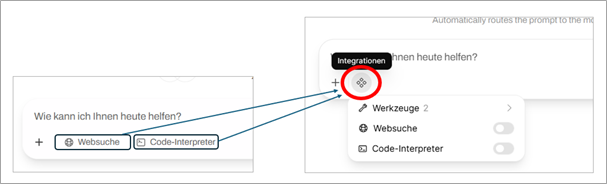
In the chat window, you will find a new icon to the right of the plus sign +: the hash symbol

When you hover over the icon with the mouse, the label Integrations appears. Clicking on it opens a menu with three integrations:

  • Tools
  • Web search
  • Code interpreter

Web search and code interpreter were previously located below the chat window.

New Tools in AI Chat

You can access the tools via the new hash symbol. You must reactivate the tools for each new chat.

1.Automatic Web Search Function

  • The automatic web search is available to the model as a tool, which it uses as needed, multiple times if necessary. This can be useful, for example, for complex questions and multi-step solutions.
  • Unlike simple web search, the model itself decides whether or not to use the web search tool.

2.Automatic Web Extraction Function

  • Automatic web extraction is also available to the model as a tool that it can use as needed.
  • This allows it to retrieve URLs specified in the chat or known elsewhere and obtain the page content. The tool is an alternative to manually attaching website content.

Automatic Model Preselection

The new “Auto” mode is now selected by default for new chats. This means that the AI chat automatically selects the appropriate model for your request. In this mode, you no longer need to select a model manually.

The process uses a language model to analyze your input and decide which AI model is most suitable.

It checks

  • whether your request contains images
  • whether it is a knowledge query, a creative task, or something else
  • the difficulty level of the question

The process does not evaluate by subject area, but by the nature of the request. The selected model is displayed to you after selection.

You can still select the desired model for a chat yourself, thereby bypassing the automatic selection.

Model Replacement

The Qwen3 235B model is being replaced by the new Qwen3 235B VL variant, which now also recognizes and can process images. Gemma 3 27B, which was previously used for image processing, is therefore being removed from the model selection. All image requests will be processed via Qwen3 235B VL in the future.

Since Qwen3 Coder 30B now only fulfills niche functions (e.g., as a “task” model or for FIM) and better alternatives are available in the chat context, it can now only be used via the API.

Extended Documentation

You can find new comprehensive documentation on agentic coding and API usage on our websites.

https://www.en-zdv.uni-mainz.de/ai-chat-agentic-coding/

https://www.en-zdv.uni-mainz.de/ai-chat-api-usage/


More news from the Data Center → may be found here.

Posted on | Posted in News | Tagged

Data Center takes over Services of the JGU Main Printing Office

In future, services provided by the JGU main printing office will be taken over by the Data Center.

This includes, in particular, the printing of exams, seminar documents, brochures, and flyers.

The printing office team and the Data Center are currently preparing for the upcoming move.

Until the final takeover at the end of the year, the printing office will continue to be available at its familiar address (Johann-Joachim-Becher-Weg 1).

Further information is also currently available on the main printing office website:
https://www.verwaltung.zentrale-dienste.uni-mainz.de/zentraldruckerei/


More news from the Data Center → may be found here.

Passkeys: Mandatory Login for two Applications starting in September

Starting September 1, 2025, logging in with passkeys will be mandatory for two applications:

From the effective date, registration for these applications will only be possible with a passkey. You can also use passkeys from home via a remote desktop connection, and there is no time limit for creating them on your account website.

Training and Support:
Since August, German-language training courses have been available once a quarter on the university's continuing education portal. You can find them in the IT and Digitalization category.

The next training course will take place on August 19 from 10:00 a.m. to 11:30 a.m.

If there is enough interest in an English-language event, we will also offer training in English again. Unfortunately, this offer has not been taken up enough in the past.

Further Information on Passkeys

General Information: https://www.en-zdv.uni-mainz.de/passkeys/
Create and Use Passkeys: https://www.en-zdv.uni-mainz.de/create-and-use-passkeys/
Frequently Asked Questions: https://www.en-zdv.uni-mainz.de/passkeys-frequently-asked-questions/


More news from the Data Center → may be found here.

Posted on | Posted in News | Tagged

New AI Models for the University AI Chat will be launched on August 25

Starting August 25, the Data Center will make two new models available for the AI chat.

GPT-OSS 120B and Qwen3 235B VL replace Nemotron Ultra 253B

The GPT-OSS 120B model is characterized by its particularly efficient use of computing resources and delivers results with comparatively low energy consumption. It responds quickly and reliably without placing unnecessary strain on servers.
GPT-OSS 120B provides solutions for various tasks, such as summarizing texts, answering knowledge questions, or generating creative content.

With reasoning enabled, Qwen3 235B VL delivers even better results for applications in science, technology, and software development. It impresses with advanced capabilities in solving complex problems, technical analysis, and code architecture. The variant without reasoning can be a valuable alternative when working with text or implementing code.

Overall, the models perform very well in key comparison categories and are among the best freely available models. A core selection of eight important benchmarks, which evaluate skills such as mathematical problem solving and programming tasks, can be found at https://artificialanalysis.ai/.

The following models are also available:
- Gemma3 27B for processing text and images
- Qwen3 Coder 30B for fast and accurate coding with low complexity

Standardized Limits for processing large Amounts of Text

The amount of text that the models can process at one time has been standardized. All models have around 64,000 tokens available, which is approximately 50,000 words. Tokens are small units into which the model breaks down text in order to understand it. The more tokens, the more information the chat can process and take into account at the same time.

When working with language models, there is an upper limit to how much text can be processed at one time. When you upload a document, the system automatically selects only the text passages that are most relevant to your question. These selected text passages are so short that they always remain within the permissible upper limit of 64,000 tokens.

The upper limit becomes relevant if, after uploading, you select the option to send the entire text of the document to the model at once. If the entire text exceeds the upper limit, the request will be rejected and you will receive an error message. The limit is also relevant for those who use our API interface for their own applications, as the maximum context size usually has to be stored here (output tokens are not included here).

New Features and Adjustments in recent Months

We are continuously updating and optimizing the system to offer you the highest possible level of AI chat platform. The following summary shows you the most important user-side changes in recent months.

Optimized web search mechanism: Our search function has been redesigned to deliver relevant results even faster and avoid technical issues.

Advanced Features

  • Embedding API: Developers can use our embedding model bge-m3 to integrate their applications even better with our system.
  • OCR function: Text from scanned documents is also extracted after uploading and made available to the language model (may take 1-2 minutes).

Advanced Language Features

  • Speech-to-text/transcription with Whisper: Create transcripts from audio and video files with maximum accuracy or speak prompts into a microphone.
  • Text-to-speech (English) with Kokoro: Have English texts read aloud.

User Interface & Login:

  • The user interface has been improved and the buttons are easier to find.
  • Login now takes place via login.rlp.net.

For more information about the models and other important information, please visit our website: https://www.en-zdv.uni-mainz.de/ai-at-jgu/


More news from the Data Center → may be found here.

Posted on | Posted in News | Tagged

Seafile Update with new User Interface and Features

At the beginning of September, the Data Center will upgrade Seafile to the new version 12. This will change the user interface and add additional features to Seafile.

  • The new “files” menu item combines various areas
  • New “plus sign” design element
  • Switch between list and grid view in the file view
  • Detailed information and file operations are easily accessible for selected objects
  • Optimized image view – also for mobile devices
  • Secure, anonymous sharing: protection through Seafile login or email confirmation

Detailed information can be found on our website:
https://www.zdv.uni-mainz.de/seafile/#Aktuelles_Update_Anfang_September 


More news from the Data Center → may be found here.
Posted on | Posted in News | Tagged

Adobe campus license will not be renewed in November 2025 – alternatives are already available

JGU's current license agreement for Adobe products ends on November 22, 2025. Due to significant price increases and low usage figures, the university will no longer be able to obtain a new campus license in the future.

Information for Students

What does this mean for your studies?

  • Adobe programs will no longer be available in the computer labs as of 22 November.
  • The associated Adobe training courses will no longer be offered and have already been canceled for the winter semester.

Your Options After 22 November 2025

Using Alternative Programs

Training

In the past, we offered training for the Adobe programs Photoshop and InDesign. With a short survey, we want to determine the need for training for the alternative programs from Affinity.

Take the survey and give us feedback on how you have used Photoshop, InDesign, or Illustrator so far in your studies. The survey takes a maximum of 2 minutes:
https://forms.cloud.microsoft/e/BkhXmgWdDT

We know that switching from familiar programs always involves a certain amount of effort. The selected alternatives were deliberately chosen because they cover most Adobe programs and require a short training period.

Information for employees

What does this mean for you?

  • All paid Adobe programs are affected by this decision.
  • As of 23 November 2025, you will no longer be able to use Adobe programs with the existing campus license.
  • We will then centrally uninstall the software, including all programs, from the computers managed by the Central Data Protection Administration (ZDV). You do not need to take any action yourself.

As of 22 November 2025, employees have two alternatives

  • Use alternative programs
    We have already purchased and licensed professional programs for all common application areas. These are available to you immediately free of charge. Find out on our website which programs you need for your work and switch before November:
    https://www.en-zdv.uni-mainz.de/adobe-alternatives/
  • Continue licensing Adobe programs
    If you continue to rely on Adobe programs for your work, you can purchase a new license through us. This individual license must be financed by your respective institution; billing is handled by the ZDV. Since the conditions depend heavily on the number of licenses ordered, we request your order via the following web forms:
    https://www.en-zdv.uni-mainz.de/adobe-licensing/

Important information about the transition is available on our website

We will support you during the transition

We know that the transition will mean additional work for you. Our goal is therefore to make the switch to alternative programs as smooth as possible for you.

  • Even before the campus license expires, you will have the opportunity to try out and directly use the new alternative programs; we have already purchased and licensed all programs.
  • In a weekly question and answer session, you have the opportunity to ask questions about the planned migration, alternative products, licenses, and costs. We cannot answer specific application questions about individual programs in this format.
    Every Tuesday from 10:00 to 11:00 AM and every Thursday from 2:00 to 3:00 PM.
    BBB room: https://bbb.rlp.net/rooms/ens-mkb-x60-ags/join
  • Initial training offers for Affinity’s alternative programs are already available on the university’s continuing education portal.
  • We have answered the most important questions for you:
    https://www.en-zdv.uni-mainz.de/adobe-transition-frequently-asked-questions/

If you have any further questions, please contact directly: softwarelizenzen@zdv.uni-mainz.de.


More news from the Data Center → may be found here.