
AI

AI-Chat with new Features

For the new semester, the University of Mainz's AI chat is getting an update with new features and an improved user interface.

Clearer Interface & new Icon

In the chat window, you will find a new icon to the right of the plus sign +: the hash symbol

When you hover over the icon with the mouse, the label Integrations appears. Clicking on it opens a menu with three integrations:

  • Tools
  • Web search
  • Code interpreter

Web search and code interpreter were previously located below the chat window.
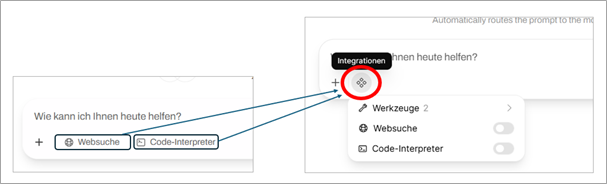
New Tools in AI Chat

You can access the tools via the new hash symbol. You must reactivate the tools for each new chat.

1.Automatic Web Search Function

  • The automatic web search is available to the model as a tool, which it uses as needed, multiple times if necessary. This can be useful, for example, for complex questions and multi-step solutions.
  • Unlike simple web search, the model itself decides whether or not to use the web search tool.

2.Automatic Web Extraction Function

  • Automatic web extraction is also available to the model as a tool that it can use as needed.
  • This allows it to retrieve URLs specified in the chat or known elsewhere and obtain the page content. The tool is an alternative to manually attaching website content.

Automatic Model Preselection

The new “Auto” mode is now selected by default for new chats. This means that the AI chat automatically selects the appropriate model for your request. In this mode, you no longer need to select a model manually.

The process uses a language model to analyze your input and decide which AI model is most suitable.

It checks

  • whether your request contains images
  • whether it is a knowledge query, a creative task, or something else
  • the difficulty level of the question

The process does not evaluate by subject area, but by the nature of the request. The selected model is displayed to you after selection.

You can still select the desired model for a chat yourself, thereby bypassing the automatic selection.

Model Replacement

The Qwen3 235B model is being replaced by the new Qwen3 235B VL variant, which now also recognizes and can process images. Gemma 3 27B, which was previously used for image processing, is therefore being removed from the model selection. All image requests will be processed via Qwen3 235B VL in the future.

Since Qwen3 Coder 30B now only fulfills niche functions (e.g., as a “task” model or for FIM) and better alternatives are available in the chat context, it can now only be used via the API.

Extended Documentation

You can find new comprehensive documentation on agentic coding and API usage on our websites.

https://www.en-zdv.uni-mainz.de/ai-chat-agentic-coding/

https://www.en-zdv.uni-mainz.de/ai-chat-api-usage/


More news from the Data Center → may be found here.

Posted on | Posted in News | Tagged

New AI Models for the University AI Chat will be launched on August 25

Starting August 25, the Data Center will make two new models available for the AI chat.

GPT-OSS 120B and Qwen3 235B VL replace Nemotron Ultra 253B

The GPT-OSS 120B model is characterized by its particularly efficient use of computing resources and delivers results with comparatively low energy consumption. It responds quickly and reliably without placing unnecessary strain on servers.
GPT-OSS 120B provides solutions for various tasks, such as summarizing texts, answering knowledge questions, or generating creative content.

With reasoning enabled, Qwen3 235B VL delivers even better results for applications in science, technology, and software development. It impresses with advanced capabilities in solving complex problems, technical analysis, and code architecture. The variant without reasoning can be a valuable alternative when working with text or implementing code.

Overall, the models perform very well in key comparison categories and are among the best freely available models. A core selection of eight important benchmarks, which evaluate skills such as mathematical problem solving and programming tasks, can be found at https://artificialanalysis.ai/.

The following models are also available:
- Gemma3 27B for processing text and images
- Qwen3 Coder 30B for fast and accurate coding with low complexity

Standardized Limits for processing large Amounts of Text

The amount of text that the models can process at one time has been standardized. All models have around 64,000 tokens available, which is approximately 50,000 words. Tokens are small units into which the model breaks down text in order to understand it. The more tokens, the more information the chat can process and take into account at the same time.

When working with language models, there is an upper limit to how much text can be processed at one time. When you upload a document, the system automatically selects only the text passages that are most relevant to your question. These selected text passages are so short that they always remain within the permissible upper limit of 64,000 tokens.

The upper limit becomes relevant if, after uploading, you select the option to send the entire text of the document to the model at once. If the entire text exceeds the upper limit, the request will be rejected and you will receive an error message. The limit is also relevant for those who use our API interface for their own applications, as the maximum context size usually has to be stored here (output tokens are not included here).

New Features and Adjustments in recent Months

We are continuously updating and optimizing the system to offer you the highest possible level of AI chat platform. The following summary shows you the most important user-side changes in recent months.

Optimized web search mechanism: Our search function has been redesigned to deliver relevant results even faster and avoid technical issues.

Advanced Features

  • Embedding API: Developers can use our embedding model bge-m3 to integrate their applications even better with our system.
  • OCR function: Text from scanned documents is also extracted after uploading and made available to the language model (may take 1-2 minutes).

Advanced Language Features

  • Speech-to-text/transcription with Whisper: Create transcripts from audio and video files with maximum accuracy or speak prompts into a microphone.
  • Text-to-speech (English) with Kokoro: Have English texts read aloud.

User Interface & Login:

  • The user interface has been improved and the buttons are easier to find.
  • Login now takes place via login.rlp.net.

For more information about the models and other important information, please visit our website: https://www.en-zdv.uni-mainz.de/ai-at-jgu/


More news from the Data Center → may be found here.

Posted on | Posted in News | Tagged

New AI Service available for JGU

The Data Center (ZDV) has provided a new AI service for Johannes Gutenberg University Mainz (JGU). This service, which is accessible at https://ki-chat.uni-mainz.de, includes several powerful language models, including Nemotron Ultra 253B, Gemma3 27B and Qwen2.5 Coder 32B.

The AI chat is initially only available to JGU employees who can log in with their JGU account. The Data Center controls and hosts the service itself, so the data (except for the web search) remains within JGU.

Future Developments

The new service will also be available to students in the future. In addition to regularly updating the language models, further improvements are in progress. The aim is to optimize the search and extraction of documents and to create a permanent knowledge repository. Connections to platforms such as Moodle or BBB and initial integrations (e.g. calculators) are also planned.

Learn More

Further information on the use of AI in higher education and support in using the service can be found on the website of the Digital Teaching Competence Team (https://digitale-lehre.uni-mainz.de/ki-in-der-hochschulbildung/ ).

Technical background information: https://www.en-zdv.uni-mainz.de/ai-at-jgu/


More news from the Data Center → may be found here.

Posted on | Posted in News | Tagged