

If you would like to configure VPN for the first time, press the Windows key on your keyboard - this will display the Windows start menu your screen.
Then enter VPN at the keyboard (without clicking anywhere).
Now click on Virtuelle private Netzwerke (VPNs) ändern:

The window Netzwerk und Internet will be shown next. Choose VPN-Verbindung hinzufügen.
In the next window the following entries are to be made or chosen:
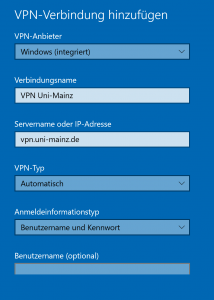
VPN-Anbieter: Windows (integriert)
Verbindungsname: this is arbitrary, you may for example call it 'VPN Uni Mainz'
Servername: vpn.uni-mainz.de
VPN-Typ: Automatisch - if you can't connect, try SSTP.
Anmeldeinformationstyp: Benutzername und Kennwort
Benutzername: your JGU login name followed by @uni-mainz.de:
yourloginname@uni-mainz.de (Please note: this does not in every case correspond with a person's e-mail address)
Kennwort: your JGU account password
If you do not enter anything in the fields for Benutzername and Kennwort, then you will be asked for them each time you establish a VPN connection. In case you want to save your login data, activate the checkbox 'Anmeldeinformationen speichern'. Then click on Speichern. Now the connection is permanently configured, but not yet active. In order to activate it, click on Verbinden within the open window.
If your are activating the connection for the first time you will see the follwoing notice: "Der Server kann nicht überprüft werden, da hierzu nicht ausreichend Informationen vorliegen. ..."
After clicking on Serverdetails anzeigen you will be shown the "thumbprint" of the VPN server:
You should verify that the string displayed for the server's fingerprint is indeed identical to the following:
ce 4f f9 ac 2b e0 f9 28 57 10 8e b9 c4 c0 53 1a 47 32 89 80
Then click Connect to establish the connection.
To disconnect from the VPN later, click the icon for your network connection in the bottom-right corner of the taskbar. In the list of available network connections that appears, select the VPN connection and click Disconnect. Similarly, the next time you want to reconnect, click Connect.
Having trouble setting it up?
We’ve posted an alternative workaround for you online:
https://www.zdv.uni-mainz.de/vpn-workaround-unter-windows-11/